MKV to MP4 Without Re-Encoding: The FFmpeg Remux, Tested
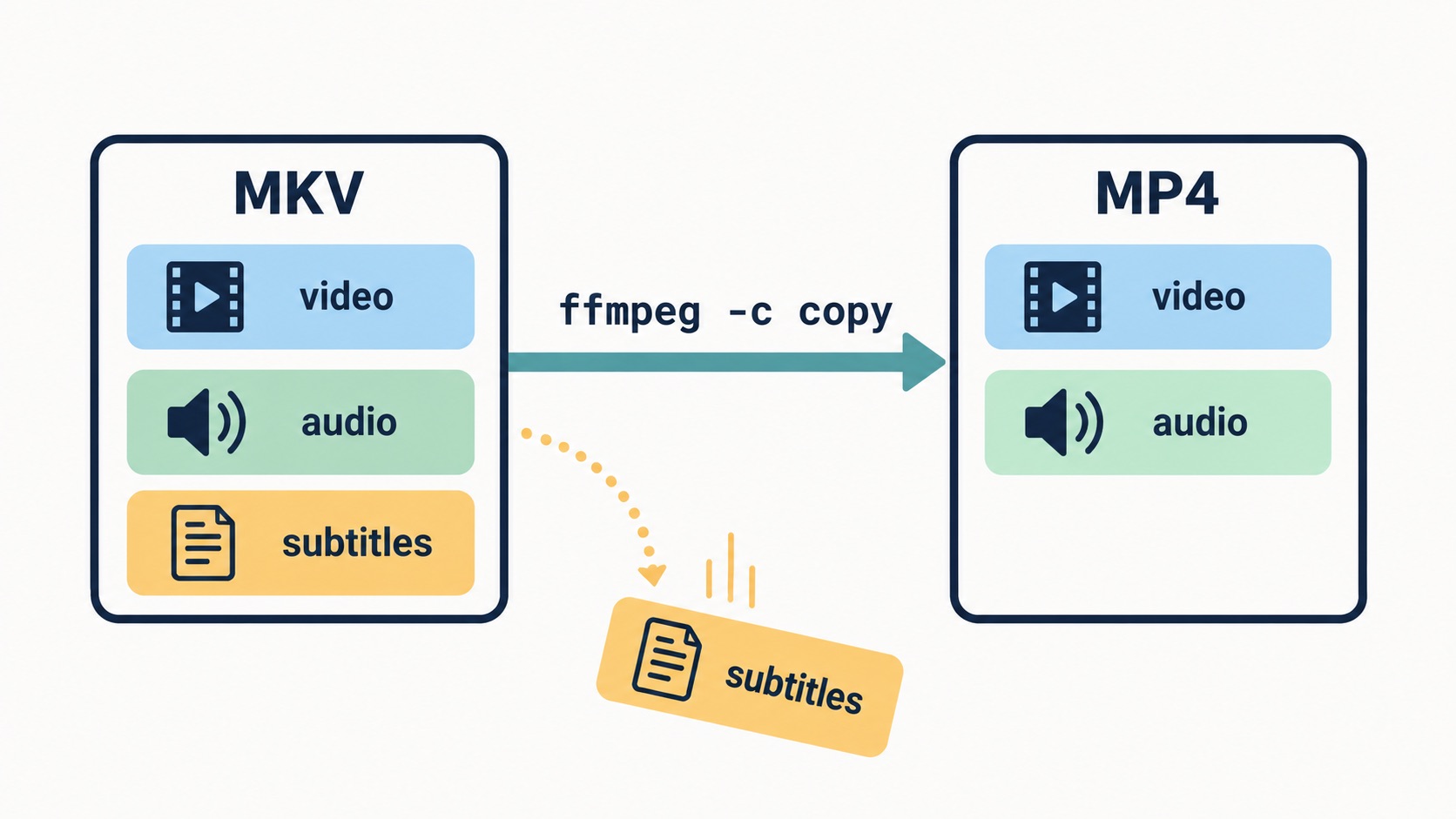
The command is ffmpeg -i input.mkv -c copy output.mp4. Stream copy lifts the compressed video and audio out of the Matroska container and writes them into an MP4 container without recompressing a single frame - no re-encoding, no quality change, done in seconds. Whether it works depends entirely on what is riding inside your MKV, and that is where MKV differs from every other source: Matroska accepts nearly any codec ever shipped, so an MKV can hold streams MP4 has no seat for. This page's commands and outcomes were all run and checked on FFmpeg 9 before writing - including one failure mode that exits with code zero and no error message at all.
What stream copy does to an MKV
MKV (Matroska) and MP4 are both containers - boxes holding compressed streams with timestamps and metadata. Matroska is the permissive one, which is why Blu-ray backups, multi-language rips, and files with embedded subtitles land in MKV by default. MP4 is a strict seat map: a short list of codecs with reserved places, and no seat means no boarding. Remuxing moves passengers between boxes without touching them, so the job succeeds exactly when every stream in your MKV has an MP4 seat.
On a two-second H.264 + AAC test clip built for this page, the .mkv came out at 198,926 bytes and the stream-copied .mp4 at 201,010 - the MP4 was about 2 KB larger, because Matroska's bookkeeping is leaner than MP4's. The same test run from an MOV source goes the other way by a few hundred bytes (MOV and MP4 are siblings; Matroska is not family). Either direction, the difference is packaging overhead - the streams inside were identical on both sides, ffprobe reporting h264 + aac before and h264 + aac after. That identity is the whole definition of a lossless container change.
What survives the move - and what doesn't
- H.264 video + AAC audio - the universal pair. Copies straight over, plays everywhere. When this is what is inside, the one-liner is the whole answer.
- HEVC video - fits, with a tag caveat that decides whether Apple devices open the file (below).
- AC3 audio - copies into MP4 legally (this page's test did exactly that), but QuickTime and browser support is spotty; audio headed to Apple gear is better re-encoded to AAC.
- SRT or ASS subtitle tracks - silently dropped. No error, no warning line you would notice, exit code zero. This is the trap of the whole operation and gets its own section.
- TrueHD audio - refused outright, with an error. Also its own section.
The silent subtitle drop
Take an MKV in the standard shape of an archived episode - h264 video, aac audio, one subrip (SRT) subtitle track. Run ffmpeg -i input.mkv -c copy output.mp4. FFmpeg exits successfully. No error, no refused file, no zero-byte output. The MP4 plays perfectly.
The subtitle track is gone.
Probe both files and the story is visible: the MKV lists three streams (h264, aac, subrip), the MP4 lists two (h264, aac). An ASS-format subtitle track fared the same in testing - dropped without a word. The only trace during the run is one statistics line, subtitle:0KiB, easy to miss in a terminal and invisible inside any GUI wrapper. If your remux workflow is "run the command, trust the exit code", your subtitles have been quietly vanishing.
The fix is a separate instruction for subtitles alone, converting just that stream:
ffmpeg -i input.mkv -c copy -c:s mov_text output.mp4
Video and audio still stream-copy untouched; the subtitle track becomes mov_text, the one subtitle format MP4 reserves a seat for. Verified on the same test file: the output lists h264, aac, mov_text. The habit worth keeping is bigger than subtitles - after any remux, run ffprobe on the output and count streams against the source. Trust files, not exit codes; the same discipline is what catches other invisible changes, like a vanished alpha channel (the check page).
HEVC fits - but check which tag it boards with
An HEVC stream copies from MKV into MP4 without complaint. The catch showed up in testing: FFmpeg writes it with the codec tag hev1 by default, while parts of the Apple ecosystem - QuickTime among them - expect hvc1. The video bytes are identical either way; the label differs, and the label decides whether some players open the file at all. One flag settles it:
ffmpeg -i input.mkv -c copy -tag:v hvc1 output.mp4
The test file written this way reports hvc1, and that is the version to hand anyone with an iPhone or a Mac in the loop. If a remuxed HEVC file "won't open" on exactly one family of devices and plays everywhere else, this tag is the first suspect.
When FFmpeg refuses: TrueHD, and what the refusal means
Lossless audio tracks get the opposite treatment from subtitles - an honest refusal. Remuxing a TrueHD test file stopped the run:
[mp4 @ ...] truehd in MP4 support is experimental, add '-strict -2' if you want to use it. / Could not write header (incorrect codec parameters ?): Experimental feature
No output file, a nonzero exit code, nothing ambiguous. (Technically you can force it with -strict -2; practically, "experimental in MP4" means no mainstream player promises to decode it, which defeats the point of a compatibility container.) TrueHD, DTS-HD and similar lossless audio are half the reason MKV exists - they have no reliable MP4 seat. When your file's value is "everything, in one box", the honest answer is to stay in MKV.
When re-encoding is actually the answer
Two situations end the remux conversation. First, the target genuinely needs a different codec - VP9 or AV1 video heading to a general audience, or lossless audio that must become AAC. Second, the file must shrink: a remux changes size by kilobytes, ever, because size lives in the streams, not the box (containers explained properly). Then it is a re-encode with the quality dial that implies:
ffmpeg -i input.mkv -c:v libx264 -crf 23 -preset medium -c:a aac output.mp4
What -crf costs and saves is laid out in the MOV remux guide - same ladder, one container over. One tell worth knowing: a remux is seconds of work even on large files. Any tool that spends twenty minutes "converting" your MKV is re-encoding it, whatever the progress bar says - the autocomplete cluster "handbrake convert mkv to mp4 without transcoding" is people hunting for this lossless move in a GUI and mostly finding transcoders.
Pick in twenty seconds
- H.264 + AAC inside, need the .mp4 name → -c copy; instant, lossless, done.
- Subtitles matter → -c copy -c:s mov_text, then ffprobe the output and count streams.
- HEVC inside, Apple devices downstream → -c copy -tag:v hvc1.
- FFmpeg refuses a track, or you need TrueHD/DTS-HD kept → no MP4 seat exists; stay in MKV or re-encode and choose what survives.
- File must get smaller → re-encode with -crf; keep the original as the master.
- The clip still needs its background removed before any of this → start at the main guide.
Disclosure: This site is reader-supported. Some pages contain affiliate links; this one doesn't.